Sunday, 28 June 2015

MATERIAL UI FOR LAVA IRIS X8


Material ROM FOR LAVA IRIS X8


* Material UI
* Sensor working
* Dual Sim 3g 
* BT Tweks
* Pre-Rooted
* Dolby added
* Gapps Included
* Viper4android added
*Optimized speed and WiFi
*Touch effect optimization
*Optimized CPU running
*Deodex
*Optimized memory management
*Optimized network
*Optimized battery power
*Zipaliagned*
*Improve picture quality and Camera quality
*Unlocked FPS, improving 2D / 3D performance
* Many More....
And Lots Of Stuff I Dont Remember Now


HOW TO INSTALL


1. Place downloaaded rom zip into root of sd.
2. wipe data, cache , dalvik cache using custom recovery
3. select install zip from sd and select rom zip .
4. reboot and enjoy


BUGS
camera not working
soon to be solved


Credits

Pinto Thakur
Amit Kumar
Lan gooner FOR ROM
Manhar Gupta


DOWNLOAD


CAMERA PATCH +AUDIO IN ONE FILE


Friday, 19 June 2015

Making Our device a bit better

*Thanks to slad480

Features 

- Full memory management.
-Linux kernel tweaks and improvements for better performance and battery life.
- Entropy generator engine used to reduce lags.
- Zipalign apps in "/system" and apps in "/data" every 48 hours which result in less RAM usage.
- Sqlite optimizations and faster database access.
- CPU governors tweaks and improvements for better performance and battery life.
- Increased SD Card read-ahead cache to 2048 KB .
- Ad blocking.
- Build.prop tweaks and improvements.
- Cleans log files and tombstones at every boot.
- Many other tweaks for better performance and battery life!


How to install :

Before Flashing please do a nandroid backup to avoid any incompatibility issues.
1. Download the Fly-On Mod main pack and sqlite pack according to your phone's Android version.
2. Rebooting into recovery mod.
3. Install Signed_Fly-On_Mod_V4.0-Alphax.zip and sqlite_xversion.
4. Reboot and feel the smoothness!


link to flashable zip
orignal xda thread http://forum.xda-developers.com/showthread.php?t=2226373
* I M NOT RESPONSIBLE FOR BRICKED DEVICES

Wednesday, 3 June 2015

CUSTOM RECOVERY FOR MTK DEVICES

Custom CWM Recovery For MTK


CWM RECOVERY For Micromax, Karbonn, ZTE, Huawei, Dogee, All Samsung Clones, All iPhone Clones and all MTK Devices

THINGS YOU NEED :  
  • A MediaTek android device (MT65XX) 
  • Your phone must be rooted already: HOW TO ROOT
  • USB Chord.
  • Windows PC/Laptop.
  • For ADB Drivers : Download pdanet+

TOUGH WAY (if u don't trust me)

MTK DROID TOOLS DOWNLOAD : MTK DROID TOOLS
How To Flash ClockworkMod (CWM) Recovery on Any MediaTek (MT65xx) Android Device :


1. Download necessary files above.

2. Install the downloaded PDANet to your computer. It contains ADB Drivers.

3. Turn on your android device and connect it to your computer using USB Chord. (Make sure to Enable USB Debugging, go to phone Settings -- Developer Options -- Enable USB Debugging.)

4. From your computer, open MTK Droid Tools that you have downloaded above and extract it to your desired location.

5. Open MTK Droid Tools.exe from the extracted folder (Run as administrator). Wait for the tool to detect your device. (If UBIFS warning appeared in the status message, this process will not work for you. Only ext4 supported.). Notice on the bottom-left part of the tool, a YELLOW color indicator means that your android device is does not have root shell yet. If it is GREEN already, proceed to step 7.

6.  Click ROOT button to enable root shell your device. Wait for the progress bar on the Status, see your phone to Grant Superuser access. If the color indicator turns GREEN, then you have successfully enabled root shell for your device.

7.  Now, select the Root, Backup, Recovery tab and and further choose To Use Boot From Phone from the selections. Click Recovery and Boot, a message prompt will appear "To make CWM recovery automatically", click YES.

8. Wait for the tool to build the CWM recovery and another prompt will appear "install patched boot to phone?" select NO, wait a little bit more and another prompt will appear again "install created recovery to phone", now select YES.Auto Insurance

9. When the tool ask you to reboot your phone to recovery, click Yes and it will reboot to CWM recovery shortly. Check out your new custom recovery.Auto Insurance

Congratulations! You now have ClockworkMod custom recovery on your MediaTek android device.

EASY WAY (DONE BY ME)


THINGS YOU NEED :  
  • A MediaTek android device (MT65XX) 
  • Your phone must be rooted already: HOW TO ROOT
  • Mobile uncle tools

How To Install CWM Recovery on Lava Iris x8 and other Mtk devices

  • Download the file named recovery.img
  • Transfer the recovery.img file to the root of your phone memory via USB data cable
  • On your phone, download and install Mobileuncle Tools from the Play Store
  • Launch Mobile Uncle Tools. When it requests for Root Permissions, tap Grant
  • You should now see the Main Menu in Mobileuncle Tools
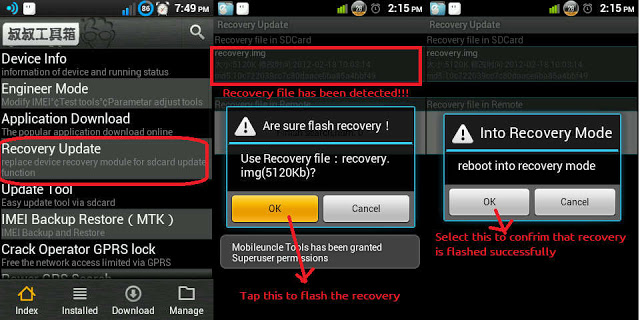
  • Tap Recovery Update
  • The app will scan your phone and list the recovery.img file you transferred to your phone earlier
  • Tap the recovery.img option. You should now see a dialog box asking you if you’re sure you want to flash the recovery. Tap OK
  • At this point, your phone may seem unresponsive. Just be patient and let the tool flash the recovery image. Once the flashing is complete, you should see another dialog box asking you to reboot to recovery, Tap OK
    image: http://cdn6.dottech.org/wp-content/uploads/2014/03/Flash-recovery-via-Mobileuncle-Tools-620x310.jpg?e55e40
    Flash recovery via Mobileuncle Tools
  • Your phone should now reboot into CWM Recovery
That’s it!! You have successfully installed CWM Recovery on your rooted Micromax Canvas 4 A210, and are all set to check out custom ROMs on your rooted device. Enjoy!!


Sunday, 24 May 2015

HEATING PROBLEMS IN ANDROID

How To Solve Heat Problem In Your Smartphone

Mostly Android Users Face The Heating Problem With Their Android Smartphone , Some Users Face Heating Problem While Playing Game Some Face Heating Problem Just By A little Bit Use , Heating Of Android Phones occur Mostly Due To Some Apps Running in Back Ground . Those Apps are use less and May push Your android Phone To Heating problem .

And Some Times Heating Of Android Phone Occurs Due To Hardware Failure issues , If There is a Hardware Issue With Your Android Smartphone And it is Giving excessive heat , Then You have to seek Help From Your Nearest android Service centres , Because Android Phone Heating issues  Due To Hardware Malfunction / Failure aren't Possible to Be solved By Software Tweaking . 
The heating in your droid maybe because of RAM and CPU usage so controlling this might be helpful ie by closing apps and not allowing them to work in background

HOW TO SOLVE THIS ?

FOR NON ROOTED USERS
Try this app
This can boost your nonrooted phone everytime u ask for a boast

Another best app to boast your device and to make it cool is this
*for its material ui and easy interface


FOR ROOTED USERS

BASIC REQUIREMENTS

  • ROOTED ANDROID (ICS+)
  • XPOSED INSTALLED
  • PATIENCE


* DO AT YOUR OWN RISK I WOULD NOT BE RESPONSIBLE FOR A BRICKED PHONE

*for instructions to install xposed check my previous posts

Download this app here

best app for rooted users and does its work itself no need to boast the device again and again

Another good app is this

a app if set properly can change your android smartphones battery life 

App list is too long and many on beta version so be connected for updates i m testing them 

Saturday, 23 May 2015

IOS STATUS BAR FOR KITKAT (4.4)


BASIC REQUIREMENTS

  • ROOTED ANDROID (ICS+)
  • XPOSED INSTALLED
  • PATIENCE
  • A WORKING BRAIN :P


* do at your own risk i would not be responsible for a bricked phone

*for instructions to install xposed check my previous posts

FEATURES
  • STATUSBAR
    • Signal position LEFT | RIGHT
    • Signal icons style SYSTEM | SOME STYLE
    • Carrier label with custom text
    • Notification icons SHOW ICONS | SHOW ICONS COUNT
    • Clock position LEFT | CENTER | RIGHT
    • Clock size
    • Battery style SYSTEM | SOME 5 OTHER STYLES
    • Battery percentage SHOW | HIDE
    • Battery percentage size
    • Tinting
  • NOTIFICATION PANEL
    • Blurred background
    • Background dim color #00000000 ... #FFFFFFFF
  • RECENT PANEL
    • Blurred background
  • WHITE KEYBOARD
  • WHITE SETTINGS APP

    DOWNLOAD

Friday, 22 May 2015

LOLLIPOP RECENT PANEL FOR ANDROID


BASIC REQUIREMENTS

  • ROOTED ANDROID (ICS+)
  • XPOSED INSTALLED
  • PATIENCE

* DO AT YOUR OWN RISK I WOULD NOT BE RESPONSIBLE FOR A BRICKED PHONE

  • *for instructions to install xposed check my previous posts

DOWNLOAD THE MODULES YOU WANT:

– Firstly, note that some modules work on all devices and some work for specific mobile brands.
Download this xposed module form this link.
Install the module and reboot your device.
open the app any personalize the way you want it to be.
What will you personalise
  • you get a lollipop status + notification bar
  • a recent panel like lollipop
  • dailer ui from lollipop (few devices)
  • animations from lollipop
  • for recent panel follow these screenshots

 select the experimental notification settings from the system ui and reboot is must.

Thursday, 21 May 2015

LOLLIPOP UI (ALMOST PURE) FOR ROOTED USERS

BASIC REQUIREMENTS

  • ROOTED ANDROID (ICS+)
  • XPOSED INSTALLED
  • PATIENCE
  • A WORKING BRAIN :P

* do at your own risk i would not be responsible for a bricked phone

A FEW POINTS TO BE NOTED BEFORE STARTING:

  1. Rooting your phone is mandatory if you want to use Xposed Installer. For rooting, you can get a guide anywhere over the internet or you can comment below so that I can help you out.
  2. If you are an android gingerbread user, you will have to use another version of the app. More info is provided in this thread.

PART 1: INSTALLING THE XPOSED FRAMEWORK:

1. Download app – Xposed Installer Apk
2. Install and launch the app, go to the section named ‘Framework’ and click on ‘Install/Update”
3. It will ask you to reboot your phone. Just press that reboot button and you have successfully installed the framework!
How to install Xposed

PART 2. DOWNLOAD THE MODULES YOU WANT:

– Firstly, note that some modules work on all devices and some work for specific mobile brands.
Download this xposed module form this link.
Install the module and reboot your device.
open the app any personalize the way you want it to be.
What will you personalise
  • you get a lollipop status + notification bar
  • a recent panel like lollipop
  • dailer ui from lollipop (few devices)
  • animations from lollipop


 for quick toggles

use power toogles from play store or u may use notification toggles / settings extended